How to Cancel Bumble and Delete Your Account (2026)
You cancel Bumble with whoever bills you, and Bumble's own terms disagree about what deleting your account does to a subscription. How to cancel on each channel, and what Bumble keeps for six to ten years after you leave.
You cancel Bumble Boost, Premium or Premium+ with whoever bills you, at least 24 hours before renewal.1 Deleting the app does not stop billing. Bumble’s terms say deleting your account doesn’t either, although another clause in the same terms says the opposite.2 So cancel first, request your data next and delete your account last.
Check how you pay first
Bumble’s terms list three routes: the Apple App Store, Google Play, or a card or PayPal through a payment processor.2 These are the clues:
- Apple: An Apple receipt, or a charge from apple.com/bill.34
- Google Play: The plan appears in your Google Play subscriptions.5
- Bumble directly: A card or PayPal charge, with the order number in your confirmation email.2 In the app, it’s under your profile and Subscription details.1 Bumble’s help center treats Apple Pay and old Bumble web purchases as billed this way, so Apple Pay doesn’t mean Apple bills you.6
Bumble’s website version is gone. If you used it, Bumble says to sign in to the app with the same account.7
How to cancel
After you cancel, you can use the subscription until the paid period ends, and it doesn’t renew.2 Deleting your account or the app doesn’t cancel a free trial either.2
1. Apple
According to Apple’s support page:3
- Open Settings and tap your name.
- Tap Subscriptions.
- Tap your Bumble subscription.
- Tap Cancel Subscription. You may need to scroll down to find it.
2. Google Play
According to Google’s help page:5
- Open your Google Play subscriptions.
- Select your Bumble subscription.
- Tap Cancel subscription and follow the instructions.
3. Bumble directly (card, PayPal, Apple Pay)
According to Bumble’s help center:8
- Open the Bumble app and tap the profile icon.
- Select Subscription details, then tap Manage your subscription.
- Choose to cancel your subscription.
Bumble’s terms point to “the payment settings option under your profile”.2 If you can’t get into the app, Bumble says its support team can help.8
How to delete your account
Bumble is app-only, so this can’t be done on the web.7 According to its help center:9

- Open the app and tap the profile icon.
- Tap the gear icon to open Settings.
- Scroll to the bottom and tap Delete account.
- Choose a reason and confirm.
Uninstalling the app does not delete your account.2
The terms, last updated 17 June 2026, say three different things about your subscription:2
- Section 6, on auto-renewal: Deleting your account “does not cancel your subscription”.
- Section 6, on refunds: If you delete your account, your subscription “will be cancelled immediately”, you lose the remaining benefits and you get no refund.
- Section 16: Your subscription “will continue until the end of the subscription period” you’ve paid for, and you still need to cancel store subscriptions to avoid more billing.
Bumble’s help center doesn’t settle it either. One article says that for subscriptions bought through the Apple App Store, deleting your account “won’t automatically cancel” them.1 Its deletion article, covering all subscribers, says subscriptions “may not cancel automatically” and to cancel first.9 So don’t count on deletion to do anything to your subscription. Cancel it separately, first.
What the app keeps after you leave
Your account stops being viewable when you delete it. From Bumble’s current privacy policy:10
| Data | Kept after deletion |
|---|---|
| Almost all profile data | 28 days |
| Linked social media data | 42 days |
| Moderation results | 90 days to 1 year (6 years if you were blocked) |
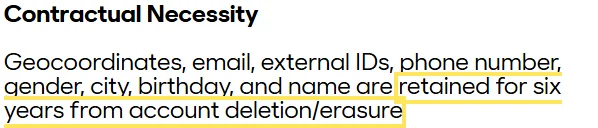
| Name, email, phone number, birthday, gender, city, geocoordinates, external IDs | 6 years |
| Support correspondence, feedback, icebreaker prompts and inputs, payment disputes | 6 years |
| Records of blocked accounts | 6 years, or 15 in severe cases |
| Legal claim files | 7 years from the case closing |
| Purchase records for tax and accounting | 10 years, then anonymized |
Face and ID data. Bumble keeps scans from photo verification as long as it needs them, but “never longer than 3 years after your last interaction with us”. It retains your ID for 90 days after ID verification. Its verification partner, Veriff, deletes the selfie, ID photo and any biometric data within 72 hours, according to Bumble, and never keeps them longer than 30 days.10
Coming back. You can restore a deleted account for up to 28 days. Bumble also starts deleting your information after four years of inactivity.10 To reactivate, its help center says to contact support.9
Can you get a refund?
Bumble’s terms say charges are generally nonrefundable, with no credit for partly used periods. Canceling alone doesn’t get you a refund: you have to request one too.2
- Apple: Apple handles these wherever you live.2 Sign in at reportaproblem.apple.com, tap I’d like to, then choose Request a refund.11
- Google Play: Bumble’s help center points to Google Play’s refund option.6 Its terms say Google handles refunds outside the US, and send US subscribers to Bumble’s customer support.2 Google says it doesn’t refund most purchases, and that after 48 hours you should contact the developer.12
- Bumble directly: Contact support with your order number and your account’s email or mobile number, or mail a signed, dated notice to Bumble, Attn.: Cancellations, P.O. Box 300940, Austin, Texas, 78703.2 Your Bumble user ID also helps.13
The terms also set out these rights:2
- 12 US states: In AZ, CA, CO, CT, IL, IA, MN, NY, NC, OH, RI and WI, you can cancel without penalty until midnight of the third business day after subscribing, excluding Sundays and holidays.
- Outside the US: You can get a refund within the first 6 days of a weekly plan, or the first 14 days of a monthly or longer plan, minus the value of what you’ve used. Renewals aren’t covered, and blocked members get nothing.
- Virtual items: These limited-use features are final and non-refundable, and you get nothing for unused ones when your account closes.
Get a copy of your data first
Bumble’s privacy policy lists a right to a copy of your information, and says to use its Feedback Page, email DPO@bumble.com or contact it.10 Its help center says chat support is the fastest route: ask to “Request data”. Your email address must be confirmed first. Bumble aims to send the file within one calendar month, and in most cases sooner. To get both sides of a conversation, you and your match each have to make a request.14 Bumble says it begins deleting your personal information 28 days after your account is deleted, so ask before you delete.9
If it doesn’t work
- Bumble isn’t in your Apple or Google list. It may be on another account or billed by Bumble directly. Apple suggests searching your email for “receipt from Apple” and checking which Apple Account it names. No Cancel button, or a red expiration message, means it’s already canceled.3 Google says the subscription may be on a different Google Account.5
- You bought twice. Bumble’s terms say duplicate subscriptions don’t qualify for a full or partial refund, so cancel the extra one as soon as you spot it.2
- You can’t reach anyone. Bumble’s help center calls its in-app Help Hub the quickest route: your profile, the question mark icon, then Start Chat.13 It offers no phone support and says it will never call you about payments or account issues.15
For what Bumble collects and charges, see our Bumble file. We have the same guide for Tinder and Hinge.
Correction, November 6, 2026: We said Bumble’s help center flatly says a subscription “won’t automatically cancel” when you delete your account. That line covers Apple App Store subscriptions, and its deletion article says subscriptions “may not cancel automatically”. We also moved our help-center citations from archived copies to the current pages, and replaced a line about retrieving data after 28 days that the current page no longer carries.
Footnotes
-
Bumble Support, “Managing your subscription”, edited 4 September 2026. https://support.bumble.com/hc/en-us/articles/31155672473117-Managing-your-subscription ↩ ↩2 ↩3
-
Bumble Terms and Conditions of Use, last updated 17 June 2026. https://bumble.com/en-us/terms (accessed 6 November 2026) ↩ ↩2 ↩3 ↩4 ↩5 ↩6 ↩7 ↩8 ↩9 ↩10 ↩11 ↩12 ↩13 ↩14
-
Apple Support, “Cancel a subscription from Apple”, published 29 September 2026. https://support.apple.com/en-us/118428 ↩ ↩2 ↩3
-
Apple Support, “Get help with charges from apple.com/bill”, published 18 July 2025. https://support.apple.com/en-us/120164 ↩
-
Google Play Help, “Cancel, pause, or change a subscription on Google Play”. https://support.google.com/googleplay/answer/7018481 (accessed 6 November 2026) ↩ ↩2 ↩3
-
Bumble Support, “Requesting a refund”, edited 10 August 2026. https://support.bumble.com/hc/en-us/articles/28783028014877-Requesting-a-refund ↩ ↩2
-
Bumble, “Bumble is now app-only”. https://bumble.com/web-not-available (accessed 6 November 2026) ↩ ↩2
-
Bumble Support, “Canceling subscriptions”, edited 20 August 2026. https://support.bumble.com/hc/en-us/articles/28534541366045-Canceling-subscriptions ↩ ↩2
-
Bumble Support, “Deleting your account”, edited 10 September 2026. https://support.bumble.com/hc/en-us/articles/28784017124381-Deleting-your-account ↩ ↩2 ↩3 ↩4
-
Bumble Privacy Policy. https://bumble.com/en-us/privacy (accessed 6 November 2026) ↩ ↩2 ↩3 ↩4
-
Apple Support, “Request a refund for apps or content that you bought from Apple”, published 17 September 2026. https://support.apple.com/en-us/118223 ↩
-
Google Play Help, “Apps, games, & in-app purchases (including subscriptions) refund policies”. https://support.google.com/googleplay/answer/15574908 (accessed 6 November 2026) ↩
-
Bumble Support, “Ways of contacting us”, edited 22 October 2026. https://support.bumble.com/hc/en-us/articles/30933835506589-Ways-of-contacting-us ↩ ↩2
-
Bumble Support, “Requesting your data”, edited 23 October 2026. https://support.bumble.com/hc/en-us/articles/28783199493917-Requesting-your-data ↩
-
Bumble Support, “Phone calls from Bumble”, edited 2 April 2026. https://support.bumble.com/hc/en-us/articles/35080219763229-Phone-calls-from-Bumble ↩